Why Do Automated Testing?
Before digging into a testing approach, lets talk about key reasons to do automated testing:
- Rapid regression testing to allow systems/applications to continue to change and improve over time without long “testing” phases at the end of each development cycle
- Finding defects and problems earlier and faster especially when tests can be run on developer machines, and as part of a build on a CI server
- Ensure external integration points are working and continue to work as expected
- Ensure the user can interact with the system as expected
- Help debugging / writing / designing code
- Help specify the behaviour of the system
Overall, with automated testing we are aiming for increased project delivery speed with built in quality.
Levels of Automated Tests
Automated tests come in a variety of different flavours, with different costs and benefits. They are sometimes called by different names by different people. For the purposes of clarity, let’s define the levels as follows:
Acceptance Tests
Highest level tests which treat the application as a black box. For an application with a user interface, they are tests which end up clicking buttons and entering text in fields. These tests are brittle (easily broken by intended user interface changes), give the most false negative breaks, expensive to write and expensive to maintain. But they can be written at a level of detail that is useful for business stakeholders to read, and are highly effective at ensuring the system is working from an end user perspective.
Integration Tests
Code which tests integration points for the system. They ensure that integration points are up and running, and that communication formats and channels are working as expected. Integration tests are generally fairly easy to write but maintenance can be time consuming when integration points are shared or under active development themselves. However, they are vital for ensuring that dependencies of the system you are building continue to work as you expect. These tests rarely give false negatives, run faster than acceptance tests but much slower than unit tests.
Unit Tests
Tests which are fine grained, extremely fast and test behaviour of a single class (or perhaps just a few related classes). They do not hit any external integration points. [This is not the most pure definition of unit tests, but for the purposes of this post, we do not need to break this category down further]. As unit tests are fast to write, easy to maintain (when they focus on behaviour rather than implementation) and run very quickly, they are effective for testing boundary conditions and all possible conditions and code branches.
Automated Test Strategy
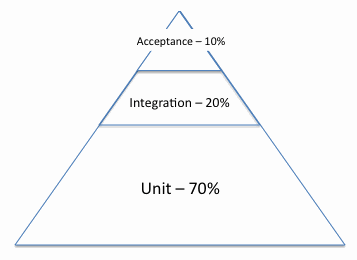
 An important part of test strategy is to decide the focus of each type of test and the testing mix. I’d generally recommend a testing mix with a majority of unit tests, some integration tests, and a small number of acceptance tests. In the test pyramid visualisation, I’ve included percentages of the number of tests, but this is just to give an idea of rough test mix breakdown.
So, why choose this sort of mix of tests? This mix allows you to cover alternative code paths and boundary conditions in tests that run very fast at the unit level. There are many combinations of these and they need to be easily maintained. Hence unit tests fit the bill nicely.
Integration tests are a slower and harder to maintain, so it’s better to have less of them, and target them specifically to cover off the risks of system integration points. It would be inefficient to test your system logic with integration tests, since they would be slow, and you would not know if the failure was from your code or from the integration point.
Finally, acceptance tests are the most expensive tests to write, run and maintain. This is why it is important to minimise the number of these, and push down as much testing as possible to lower levels. They give a great view of “Is the System working?”, but they are very inefficient for testing boundary conditions, all code paths etc. Generally, they are best for testing scenarios. For example, a scenario might be: Student logs in to the portal, chooses subjects for the semester in a multi-step wizard, then logs out. It would be best to avoid fine grained acceptance tests – they would cost more than the value they would add – ie, it would be better they had never been written. An example of such a test could be: Student chooses a subject and it is removed from the list of subjects available to be chosen. Or student enters an invalid subject code and is shown the error “Please choose a valid subject code”. Both of these would be best pushed down to a unit test level. If this is not possible, it would be best to include them in a larger scenario to avoid the set up overhead (eg, for the error message test set up, it may be necessary to log in and enter data to get to step 3 of wizard before you can check if an invalid subject code error message is displayed).
With acceptance tests, I’d recommend writing the minimum up front, just covering the happy paths and a few major unhappy paths. If defects come to light from exploratory testing, then discover how they slipped through the testing net. Why weren’t they covered by unit and integration tests, and could they be? If you have tried everything you can think of to improve lower levels of testing, and are still having too many defects creeping through, then consider upping your acceptance coverage. However, keep the cost/benefit analysis in mind. You want your tests to make your team go faster, and an overzealous acceptance suite can eat into the team’s time significantly with maintenance and much increased cost of change. Finally, keep in mind there is a manual testing option. Manual testing needs to be minimised, but if it is 3 minutes to test something manually (eg, checking something shows up in a minor external system) or a week to automate the test, you’re probably going to be better off keeping a manual test or two around.
Team Roles and Tests
Ideally it would be great to have developers who were interested in testing and the business, testers who knew how to code and the business context, and BAs who were interested in testing and coding too. Ie, a team of people who could do each role in a pinch, but were more specialised in a particular area. Unfortunately this is pretty rare outside of very small companies with small teams. In a highly differentiated team, with dedicated Developers, BAs and QAs, this generally ends up with developers writing and maintaining unit tests, doing a lot of integration tests and helping out with acceptance tests. QAs generally write some integration tests and look after writing and maintaining acceptance tests with help from developers. BAs are sometimes involved in the text side of writing acceptance tests.
English Language Text Files & BDD
There are many tools that bill themselves as Behaviour Driven Development (BDD) testing tools which are based on having features written in formulaic English, backed by regular expressions matching chunks of text then linked to procedural steps. Often using such a tools is considered BDD and a good thing in a blanket way.
Lets take a step back. BDD is about specifying behaviour, rather than implementation and encouraging collaboration between roles. All good things. BDD can be done in NUnit, JUnit, RSpec etc. There is no requirement in BDD that tests are written in formulaic English with a Given-When-Then format. The converse is also true – if you write tests which are about implementation using an English language BDD framework, you are not doing BDD.
Using an English language layer on top of normal code is expensive. It is slower to write tests (you need to edit two files every test, and get your matching regexes right), harder to debug, refactor and maintain (tracing test execution between feature text, regex and steps is time consuming and there’s less IDE support), and less scalable as suites grow large (most of these frameworks use steps which are isolated procedures with global variables for communication and no object oriented abstraction or packaging). Also for many people who are used to reading code, the English language layer is less concise and slower to read than code for specifying behaviour.
What do you get from an English language layer? It means that less technical people (eg, business sponsor and BAs) can easily read tests, and maybe just possibly, even write the English language half of tests.
It is worth carefully weighing up the costs and benefits in your situation before deciding if you want to fork out the extra development and maintenance cost for an English language layer. Unit tests and integration tests are not likely to pay dividends having an English language layer – non-technical people would not be reading or writing these tests. Acceptance tests are potentially the sweet spot. If your team’s business representative(s) or BA(s) are keen to write the English language side of the tests, while keeping in mind the granularity of a scenario style approach, you could be on to a winner. Writing these tests could really help bring the different roles on the team together and come to a common understanding.
On the other hand, if your team’s business sponsor(s) are too busy or not interested in sitting down writing tests in text files, and the BAs are not interested or have their hands full elsewhere, then there are few real benefits in having the English language layer and the same costs apply.
A middle ground is to generate readable reports from code based test frameworks. With this approach you get a lot of the benefits with much less cost. Business people and BAs cannot write tests unaided, but they can read what tests ran (a specification of the system) in clear English.
Traceability from Requirements
A concept that most commonly comes up at companies doing highly traditional SDLCs is traceability from requirements all the way to code and tests. Clearcase and some of the TFS tools are the children of this idea. Acceptance testing tools are often misused to automate far too many fine grained tests to attempt to prove that there is traceability from requirements.
A friend was explaining his area of expertise around proof of program correctness for safety critical systems where many peoples’ lives depend on a system. I totally agree that in this small subset of systems, it is vital to specify the system exactly and mathematically and prove it is correct in all cases.
However, the majority of business systems do not need to be specified in such detail or with such accuracy. Most business systems which people attempt to specify up front are written in natural language which is notorious for inexactitude and differing interpretations. As the system is written, many of these so called requirements change as the business changes, technical constraints are realised, and as people see the system working, they realise it should work differently.
Is traceability back to outdated requirements useful? Should people spend time updating these “requirements” to keep them in sync with the real system development? I would say a resounding NO. There is no point in this. If the system is already built, these artefacts have realised their value and their time is over. If documentation is required for other purposes such as supporting the system, then it is worth writing targeted documents with that audience and purpose in mind.
On the testing front, this traceability drive can lead to vast numbers of fine grained acceptance tests (eg, one for each requirement) being written in an English-language BDD test framework. This approach is naive and leads to the problems we have covered earlier.
Recent Experiences
On a project a couple of years ago which had a test square rather than a pyramid (hundreds of acceptance tests that ran in a browser), it took 2 people full time (usually a dev and a QA) to keep the acceptance suite up and running. Developers generally left updating the acceptance tests to the dedicated QA/Dev, as it took around an hour to run the full test suite, and had many false negative failures to chase up (was the failure due to an intended screen change, an integration point being down, or a real issue in the software?). The test suite was in Fitnesse for .NET, which was hard to debug and use, and had its own little wiki style version control that didn’t fit in well with the source version control system. The acceptance test suite was red the majority of the time due to false negatives, so it was hard to know if a build was really working or not. To get a green build would take luck and several tries nursing the build through. I would count this as a prime example of an anti-pattern in automated test strategy, where there were far too many fine grained acceptance tests which took far too much effort to write and maintain.
On my last 3 projects, taking the test pyramid approach, we had a small number of acceptance tests which were scenario based, covered the happy paths and a few unhappy paths. On these projects, tests ran in just a few minutes, so could be run on developer machines before check in. The maintenance overhead of updating tests could be included in the development of a story rather than requiring full time people dedicated to resolving issues. Acceptance builds had few false negatives and hence were much more reliable indicators. We also chose tools which were code/text-file based, and could be checked into version control with the rest of the source code. The resulting systems in production had low defect rates.
Conclusion
Some of the ideas in this post go against the prevailing testing fashions of the moment. However, rather than following fashion, let’s look at the costs and benefits of the ideas and tools we employ. The aim of automated testing is to increase throughput on the project (during growth and maintenance) while building in sufficient quality. Anything that costs more to build and maintain than the value it provides should be changed or dropped.