James Crisp

Software dev, tech, mind hacks and the occasional personal bit

Australian ALM Conference, and slides from ‘The Ultimate ALM Environment circa 2010’

The inaugural Australian ALM Conference has been an interesting 2 days. The first day had a number of insightful talks, especially interesting to hear Sam Guckenheimer on how Microsoft has been reshaping their internal development practices into a more agile model. Today, I enjoyed Richard‘s agile adoption talk (hear hear!) and the other highlight was the last presentation of the day, explaining what’s gone into the design of the new Windows 7 Mobile OS (though some things still seem under wraps). Also a pleasure to catch up with some old friends at the conference.

Conference organisation was very good (thanks to Anthony Borton and his team). The focus was very Microsoft centric, but next year, the plans are for a much wider variety of content. Lunar Park was a cosy conference venue and fun to go outside during the breaks and see kids screaming on rides and the sun shining on the bridge and harbour.

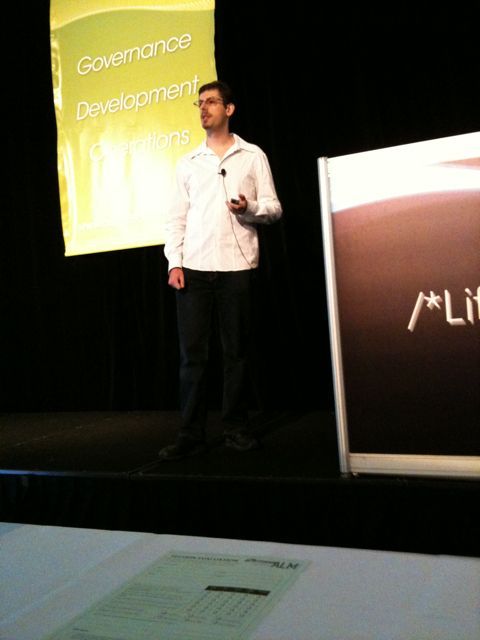
My presentation was 8.30am this morning (aargh!) but despite the early hour, there was a reasonable turn out and quite a few interested people asking questions. The plan was to co-present with Jason Yip, but he was called away to Perth so I presented solo. Unlike most other presentations at the conference, Visual Studio and TFS were barely mentioned. Instead I focused on current problems in each area of ALM, coming up with a criteria to assess this area, and what we usually do on projects to meet this criteria – eg, story walls, story maps, automated build and deploy etc. You can find the Powerpoint slides here. The slides are promises for a conversation (ie, mainly images with some notes), so don’t hesitate to contact me if you want to chat.

Also, thanks Richard for this photo from the presentation:

James Crisp presenting ‘The Ultimate ALM Environment circa 2010′

Talk: The ultimate (circa 2010) ALM environment

Jason Yip and I will be presenting on “The ultimate (circa 2010) ALM environment” at the Australian ALM Conference on 14 April. We’ll be talking about using agile methods and tools for ALM, rather than a vendor suite.

Here’s the blurb:

Based on our experiences in the field on projects and consulting with other teams, we will describe what we consider to be the ultimate development environment (which is not just about vendor tools). This session will discuss principles, practices, tools, and physical workspace design.

Hope to see you there!

nRake – Rake builds for .NET

Fed up with XML based builds that are hard to maintain, refactor and extend? Rather than trying to fix this with more xml and community tasks, or re-invent the wheel, let’s use Rake. Rake is a mature build system developed by the ruby community which can be applied equally well in the .NET world.

To help you get started quickly, I’ve put together nRake. nRake provides a template C# .NET solution with a nice directory structure (src, tools, lib, etc), a Rake build, NUnit tests, templated app and web configs for different environments (eg, dev, uat, prod, etc) and Continuous Integration server sample config files. It comes with everything you need – no additional libraries or downloads required, and all the plumbing work has been done for you.

How to use

  • Git clone or Download nRake as a Zip
  • Rename PlaceHolder app and tests to reflect your project
  • Run rake in the root of the project. This will clean, compile, template config files and run unit tests.
  • Start developing your app! How easy was that 🙂
  • Note: nRake currently uses Ruby 1.9 since IronRuby start up time was prohibitively slow. Hopefully IronRuby will get faster, and then nRake can make use of it. Also nRake uses the Albacore Gem for .NET build tasks. Documentation on Albacore tasks here.

    Also check out the IronRuby update!

Buying Books Online in Australia – Alternatives to Amazon

In the past, I have been a happy customer of Amazon USA for technical books, and more recently, even for fiction. Australian bookshops seem to have very limited and expensive stock, so buying online is an attractive option.

Recently some of my colleagues recommended two other options:

  • Book Depository UK: good prices, free international shipping, fast delivery, but at first glance less books than Amazon
  • Booko book price comparison: compares multiple sites including Amazon and BookDepository. Presumably make money using affiliate links from search.

I’ll be giving these a go and posting on the experience in future.

Monitoring MySQL Slave Replication Status with Ruby and Cron

When offering higher levels of uptime on a web site backed by MySQL, a good approach is to set up a MySQL master-slave configuration for failover between servers. This generally works quite well, but once in a while, there is a problem or error that causes the replication to cease. The slave then ceases to process updates and gets out of sync with the master.

The script below is a quick and easy approach to monitoring the status of replication on the slave. If the slave thread or IO ceases, the slave gets more than 120 seconds behind the master, or there is an error, the script will email all the slave status information to an email address you specify to alert you that you need to log in and sort things out. I run the script from cron so that I get notified fairly soon if a problem arises.

RAILS_ENV = 'production'
ALERT_EMAIL_ADDRESS = '[email protected]'

require 'open3'
require 'socket'
require "#{File.dirname(__FILE__)}/../../config/environment.rb"

r = ActiveRecord::Base.connection.execute("show slave status").fetch_hash
unless  r["Slave_IO_Running"] == "Yes" && r["Slave_SQL_Running"] == "Yes" &&
  r["Last_Errno"] == "0" && r["Seconds_Behind_Master"].to_i < 120

    status = "*** STATUS ***\\n" + r.to_a.collect { |i| "#{i[0]}: #{i[1]}\\n" }.join
    subject = "MySQL Slave Replication Down on #{Socket.gethostname}"

    Open3.popen3("mail -s \"#{subject}\" #{ALERT_EMAIL_ADDRESS}") do |stdin, stdout, stderr|
       stdin.write(status)
    end
end

Note: This script relies on being part of a rails app to get a database connection. It would be fairly easy to modify it to include db credentials and open the connection.

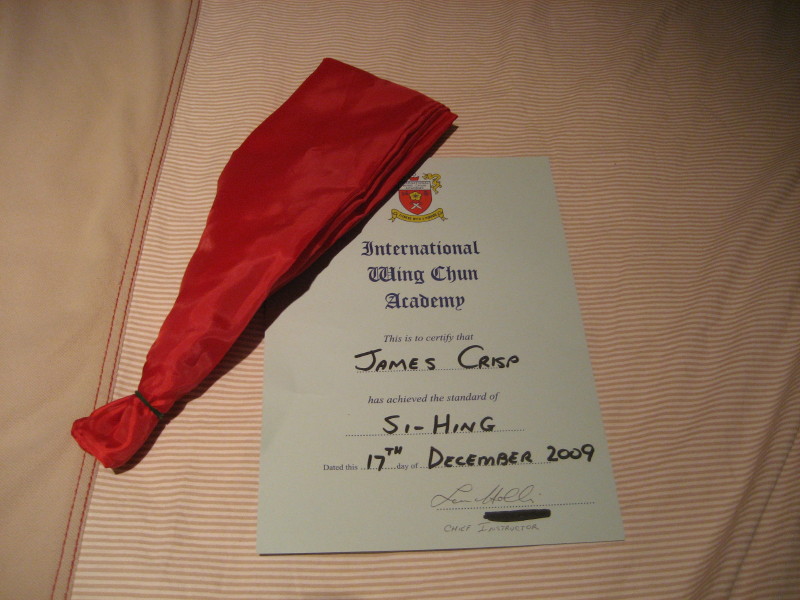
Si-Hing (Wing Chun Junior Instructor)

Last Thursday, I finally took my Si-Hing (Junior Instructor) grading, and passed!

Si-hing sash & certificate

HTML to PDF Conversion Plugin For Rails (A fork of wicked pdf)

Once a business web application reaches a certain size, the need often arises to generate PDFs from HTML/CSS.

Up until recently, the story around this for a MRI Rails application was not good. You could either use tools like Prawn, which require a description of the layout in a specific DSL, or pay for a tool like Prince XML which can convert from HTML, but which costs quite a bit. Those using JRuby were in a stronger position as they could use the Java PDF library called Flying Saucer.

The good news is that PDF generation for MRI Ruby is now easy and free, thanks to webkit, the open source webkit wrapper called wkhtmltopdf and mileszs’s wickedpdf plugin. I was really excited to come across this plugin and started to use it right away. However, it had a couple of issues:

  • Temp file handling caused errors when two PDFs were being generated within the same second (eg, 2 requests at almost the same time)
  • Problems generating PDF were not reported

Galdomedia forked the code and updated it to use standard Ruby temp files. This was great for ruby 1.7, but not good for Ruby 1.6 which does not allow you to set the extension on temp files (wkhtmltopdf relies on having a .html extension).

As my production servers run Ruby 1.6, I needed a different approach. My fork uses streams rather than temporary files, and adds some basic error handling and basic integration tests.

To install in a rails app:

script/plugin install git://github.com/jcrisp/wicked_pdf.git

Or clone the code from GitHub.
Presentation Zen by Garr Reynolds

presentationzen.jpgAfter being impressed by Garr Reynolds speaking in Sydney a year or so ago, I’ve been keen to check out his Presentation Zen book. It is an enlightening read, especially if you have never studied art or graphics design. The book is a little over 200 pages long, with many illustrations and a impressive, clean layout (no surprise there!).

Near the start of the book, Garr talks about creativity requiring an open mind (child like) and a willingness to be wrong, and to experiment. He recommends exercising restraint, and focusing on simplicity, clarity and brevity. He starts presentations brainstorming using pen and paper, whiteboards or post-its rather than in front of the computer (personally I often use story cards as you can jot slide outlines on them, group, and shift the order around). He recommends grouping the ideas, and identifying the core message and sticking with that message throughout the whole presentation.

Garr highlights the importance of taking the time to slow down and really think about what to put in the presentation. He suggests that you keep two important questions in mind: “What’s your point?” (what one thing do you want the audience to remember), and “Why does it matter?” (put yourself in the audiences’ shoes). If bits of your content don’t aid in answering these questions, “when in doubt, cut it out”! Garr also suggests an “Elevator test” – can you make your pitch in 30-45 seconds? A structure that works well is starting with an introduction which explains the issue (the pain) and the core message. Then something like 3 parts that support your assertions or solve the pain (sounds a bit like Bosworth’s Solution Selling).

“Amplification through simplification” is central to Garr’s design approach. He advocates lots of empty space to highlight just one or a few important elements on a slide. “Simplicity can be obtained through the careful reduction of the non-essential” and decreasing the signal vs noise ratio of the slides. Garr is a big fan of using images on slides with just a few words. The aim is to make slides which have strong, memorable impact, and enhance the presenter’s spoken words. He also highlights the importance of having the audience know where to look. Eg, simplicity plus images leading the eye to the right spot (eg, people in images on the slide look towards the words on the slide). Garr is a big fan of using quotes to support his points.

Garr suggests a mix of symmetrical and asymmetrical slides. Symmetrical are more formal and static, where as asymmetrical slides are often more dynamic and interesting and activate empty space. He also suggests using a grid, such as the rule of thirds (2 horizontal and 2 vertical lines providing a grid of 9 equally sized boxes), with the main subject placed on one of the crossing points of the lines. Contrast (using colour, shape, space, etc) can be used to make an element stand out and helps the viewer “get” the point of the design quickly. Repetition can be used (eg, text on each slide in an image of a post-it) to provide a professional and unified look. Use proximity to group related objects.

Although Garr doesn’t talk about it explicity, his sample slides tend to make use of clever typography. Often lower case text, with most important part in a bigger font. A mix of colours and sizes and styles and sometimes rotations to add interest to the slides. Generally sans-serif fonts.

On presenting itself, Garr says you should be completely present – enthusiastic and completely focused on presentation that you are giving, lost in the moment. Nothing else. Although you may make mistakes, don’t dwell on them. Practice like mad to become confident and appear easy and natural for the presentation. However, remain flexible, aware and open to possibilities as they arise (being “in the moment”).

Near the end of the book, Garr says: “It’s not about us [the presenter], it’s about them. And about the message.”. He also suggests that shorter is better, leave the audience wanting more, not overloaded (as per Japanese proverb “eat until 80% full”). On delivery, Garr suggests standing front and centre, leaving the lights on and advancing slides with a remote.

Garr’s points are much more clearly illustrated using images in the book. I would recommend Presentation Zen to anyone who is interested in making more visually inspiring and interesting presentations.

Percent Number in Apache Rewrite Rules (mod_rewrite)

What do the %1 %2 in a Rewrite rule mean? The Apache guide does not help, nor does any other documentation I found. I came across the %1, %2 etc in some complex and arcane rules. Google ignores percent signs, which makes it hard to get an easy answer.

We’ll use the rules from my last post as an example.

RewriteCond %{HTTP_HOST} !^www\. [NC]
RewriteCond %{HTTP_HOST} ^([a-z.]+)$ [NC]
RewriteRule ^/(.*)$ http://www.%1/$1 [R=301,L]

The %1 refers to the capture group in a previous RewriteCond. This differentiates it from the $1 which refers to a capture group in the current RewriteRule.

Hopefully I have littered this post with enough keywords that future googlers will find the answer to the %1 %2 in ReWrite rules more easily 🙂

Adding WWW to domains, and Apache Rewrite Rules (mod_rewrite)

Browse to http://google.com. Then look at the address bar. You’re not really at http://google.com. You’ve been redirected to http://www.google.com. Try the same on w3c, Facebook, Sydney Morning Herald etc.

Why WWW?
Why do all these sites redirect you to a www form? Well, the main reason is because it is advantageous to have a canonical URL, and, if your have to choose one URL, you might as well go with what people seem to expect, which is to include a ‘www’.

What’s so great about having one canonical URL?

  • Cookies: if your users can access the site at www.domain.com and domain.com, you can end up with some horrible cookie and session problems depending on the browser and web framework (behaviour is different between Firefox and IE). Stay tuned for another post with more details on this.
  • Certificates for HTTPS: certificates are usually for a single domain. If your site is available with and without ‘www’, your site will need a certificate for each or a multi-domain certificate (ie, more money and config).
  • Caching: if you have two URLS, any HTTP caching will only be half as effective
  • SEO: your page rank may be split between links to both possible URLs (though Google Webmaster tools seems to let you combine it)

How?
Right so, now you’re probably just hoping there is an easy way to implement this forced ‘www’ business! Well the good news is that it’s quite easy if you’re using Apache with mod_rewrite. I googled around to try and find some good rules, but the ones I found were tied to a single hard coded domain (no good for me where I have multiple domains pointing to the same server for different countries). See below for what I came up with. It seems to work quite well. You can put it in your virtual host configuration file or even .htaccess file.

RewriteEngine on
RewriteCond %{HTTP_HOST} !^www\. [NC]
RewriteCond %{HTTP_HOST} ^([a-z.]+)$ [NC]
RewriteRule ^/(.*)$ http://www.%1/$1 [R=301,L]

Line 1: Are you coming to the site without www. at the start of the host? [NC] means ignore case.

Line 2: Does your domain comprise of letters and dots (this means that going to the IP address will not fire the rewrite rule). Grab the domain in a capture group.

Line 3: Rewrite the URL with a www at the front, and keep the hostname from the previous condition (%1) and the path after the domain ($1). Use a status code 301, to tell the client that this is a permanent redirect.

Page 7 of 21

Powered by WordPress & Theme by Anders Norén