Software dev, tech, mind hacks and the occasional personal bit

Category: Technical Page 6 of 15

Monitoring MySQL Slave Replication Status with Ruby and Cron

When offering higher levels of uptime on a web site backed by MySQL, a good approach is to set up a MySQL master-slave configuration for failover between servers. This generally works quite well, but once in a while, there is a problem or error that causes the replication to cease. The slave then ceases to process updates and gets out of sync with the master.

The script below is a quick and easy approach to monitoring the status of replication on the slave. If the slave thread or IO ceases, the slave gets more than 120 seconds behind the master, or there is an error, the script will email all the slave status information to an email address you specify to alert you that you need to log in and sort things out. I run the script from cron so that I get notified fairly soon if a problem arises.

RAILS_ENV = 'production'
ALERT_EMAIL_ADDRESS = '[email protected]'

require 'open3'
require 'socket'
require "#{File.dirname(__FILE__)}/../../config/environment.rb"

r = ActiveRecord::Base.connection.execute("show slave status").fetch_hash
unless  r["Slave_IO_Running"] == "Yes" && r["Slave_SQL_Running"] == "Yes" &&
  r["Last_Errno"] == "0" && r["Seconds_Behind_Master"].to_i < 120

    status = "*** STATUS ***\\n" + r.to_a.collect { |i| "#{i[0]}: #{i[1]}\\n" }.join
    subject = "MySQL Slave Replication Down on #{Socket.gethostname}"

    Open3.popen3("mail -s \"#{subject}\" #{ALERT_EMAIL_ADDRESS}") do |stdin, stdout, stderr|
       stdin.write(status)
    end
end

Note: This script relies on being part of a rails app to get a database connection. It would be fairly easy to modify it to include db credentials and open the connection.

HTML to PDF Conversion Plugin For Rails (A fork of wicked pdf)

Once a business web application reaches a certain size, the need often arises to generate PDFs from HTML/CSS.

Up until recently, the story around this for a MRI Rails application was not good. You could either use tools like Prawn, which require a description of the layout in a specific DSL, or pay for a tool like Prince XML which can convert from HTML, but which costs quite a bit. Those using JRuby were in a stronger position as they could use the Java PDF library called Flying Saucer.

The good news is that PDF generation for MRI Ruby is now easy and free, thanks to webkit, the open source webkit wrapper called wkhtmltopdf and mileszs’s wickedpdf plugin. I was really excited to come across this plugin and started to use it right away. However, it had a couple of issues:

  • Temp file handling caused errors when two PDFs were being generated within the same second (eg, 2 requests at almost the same time)
  • Problems generating PDF were not reported

Galdomedia forked the code and updated it to use standard Ruby temp files. This was great for ruby 1.7, but not good for Ruby 1.6 which does not allow you to set the extension on temp files (wkhtmltopdf relies on having a .html extension).

As my production servers run Ruby 1.6, I needed a different approach. My fork uses streams rather than temporary files, and adds some basic error handling and basic integration tests.

To install in a rails app:

script/plugin install git://github.com/jcrisp/wicked_pdf.git

Or clone the code from GitHub.

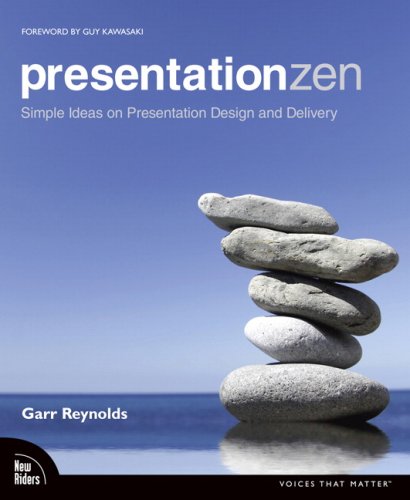
Presentation Zen by Garr Reynolds

presentationzen.jpgAfter being impressed by Garr Reynolds speaking in Sydney a year or so ago, I’ve been keen to check out his Presentation Zen book. It is an enlightening read, especially if you have never studied art or graphics design. The book is a little over 200 pages long, with many illustrations and a impressive, clean layout (no surprise there!).

Near the start of the book, Garr talks about creativity requiring an open mind (child like) and a willingness to be wrong, and to experiment. He recommends exercising restraint, and focusing on simplicity, clarity and brevity. He starts presentations brainstorming using pen and paper, whiteboards or post-its rather than in front of the computer (personally I often use story cards as you can jot slide outlines on them, group, and shift the order around). He recommends grouping the ideas, and identifying the core message and sticking with that message throughout the whole presentation.

Garr highlights the importance of taking the time to slow down and really think about what to put in the presentation. He suggests that you keep two important questions in mind: “What’s your point?” (what one thing do you want the audience to remember), and “Why does it matter?” (put yourself in the audiences’ shoes). If bits of your content don’t aid in answering these questions, “when in doubt, cut it out”! Garr also suggests an “Elevator test” – can you make your pitch in 30-45 seconds? A structure that works well is starting with an introduction which explains the issue (the pain) and the core message. Then something like 3 parts that support your assertions or solve the pain (sounds a bit like Bosworth’s Solution Selling).

“Amplification through simplification” is central to Garr’s design approach. He advocates lots of empty space to highlight just one or a few important elements on a slide. “Simplicity can be obtained through the careful reduction of the non-essential” and decreasing the signal vs noise ratio of the slides. Garr is a big fan of using images on slides with just a few words. The aim is to make slides which have strong, memorable impact, and enhance the presenter’s spoken words. He also highlights the importance of having the audience know where to look. Eg, simplicity plus images leading the eye to the right spot (eg, people in images on the slide look towards the words on the slide). Garr is a big fan of using quotes to support his points.

Garr suggests a mix of symmetrical and asymmetrical slides. Symmetrical are more formal and static, where as asymmetrical slides are often more dynamic and interesting and activate empty space. He also suggests using a grid, such as the rule of thirds (2 horizontal and 2 vertical lines providing a grid of 9 equally sized boxes), with the main subject placed on one of the crossing points of the lines. Contrast (using colour, shape, space, etc) can be used to make an element stand out and helps the viewer “get” the point of the design quickly. Repetition can be used (eg, text on each slide in an image of a post-it) to provide a professional and unified look. Use proximity to group related objects.

Although Garr doesn’t talk about it explicity, his sample slides tend to make use of clever typography. Often lower case text, with most important part in a bigger font. A mix of colours and sizes and styles and sometimes rotations to add interest to the slides. Generally sans-serif fonts.

On presenting itself, Garr says you should be completely present – enthusiastic and completely focused on presentation that you are giving, lost in the moment. Nothing else. Although you may make mistakes, don’t dwell on them. Practice like mad to become confident and appear easy and natural for the presentation. However, remain flexible, aware and open to possibilities as they arise (being “in the moment”).

Near the end of the book, Garr says: “It’s not about us [the presenter], it’s about them. And about the message.”. He also suggests that shorter is better, leave the audience wanting more, not overloaded (as per Japanese proverb “eat until 80% full”). On delivery, Garr suggests standing front and centre, leaving the lights on and advancing slides with a remote.

Garr’s points are much more clearly illustrated using images in the book. I would recommend Presentation Zen to anyone who is interested in making more visually inspiring and interesting presentations.

Percent Number in Apache Rewrite Rules (mod_rewrite)

What do the %1 %2 in a Rewrite rule mean? The Apache guide does not help, nor does any other documentation I found. I came across the %1, %2 etc in some complex and arcane rules. Google ignores percent signs, which makes it hard to get an easy answer.

We’ll use the rules from my last post as an example.

RewriteCond %{HTTP_HOST} !^www\. [NC]
RewriteCond %{HTTP_HOST} ^([a-z.]+)$ [NC]
RewriteRule ^/(.*)$ http://www.%1/$1 [R=301,L]

The %1 refers to the capture group in a previous RewriteCond. This differentiates it from the $1 which refers to a capture group in the current RewriteRule.

Hopefully I have littered this post with enough keywords that future googlers will find the answer to the %1 %2 in ReWrite rules more easily 🙂

Adding WWW to domains, and Apache Rewrite Rules (mod_rewrite)

Browse to http://google.com. Then look at the address bar. You’re not really at http://google.com. You’ve been redirected to http://www.google.com. Try the same on w3c, Facebook, Sydney Morning Herald etc.

Why WWW?
Why do all these sites redirect you to a www form? Well, the main reason is because it is advantageous to have a canonical URL, and, if your have to choose one URL, you might as well go with what people seem to expect, which is to include a ‘www’.

What’s so great about having one canonical URL?

  • Cookies: if your users can access the site at www.domain.com and domain.com, you can end up with some horrible cookie and session problems depending on the browser and web framework (behaviour is different between Firefox and IE). Stay tuned for another post with more details on this.
  • Certificates for HTTPS: certificates are usually for a single domain. If your site is available with and without ‘www’, your site will need a certificate for each or a multi-domain certificate (ie, more money and config).
  • Caching: if you have two URLS, any HTTP caching will only be half as effective
  • SEO: your page rank may be split between links to both possible URLs (though Google Webmaster tools seems to let you combine it)

How?
Right so, now you’re probably just hoping there is an easy way to implement this forced ‘www’ business! Well the good news is that it’s quite easy if you’re using Apache with mod_rewrite. I googled around to try and find some good rules, but the ones I found were tied to a single hard coded domain (no good for me where I have multiple domains pointing to the same server for different countries). See below for what I came up with. It seems to work quite well. You can put it in your virtual host configuration file or even .htaccess file.

RewriteEngine on
RewriteCond %{HTTP_HOST} !^www\. [NC]
RewriteCond %{HTTP_HOST} ^([a-z.]+)$ [NC]
RewriteRule ^/(.*)$ http://www.%1/$1 [R=301,L]

Line 1: Are you coming to the site without www. at the start of the host? [NC] means ignore case.

Line 2: Does your domain comprise of letters and dots (this means that going to the IP address will not fire the rewrite rule). Grab the domain in a capture group.

Line 3: Rewrite the URL with a www at the front, and keep the hostname from the previous condition (%1) and the path after the domain ($1). Use a status code 301, to tell the client that this is a permanent redirect.

Po: Beyond Yes and No by Edward de Bono (Book Review)

A few months back, I came across Edward de Bono’s book on Po at a local post office second hand book sale. I decided to risk 50c and buy this out of print, 1972 edition book on creativity and lateral thinking. It was worth every cent 🙂

Until you get a fair way into the book, it’s quite hard to work out what it is about. It is also quite wordy, and oddly organised. However, after reading it for a bit, I found it had some interesting ideas.

De Bono is not a big fan of the yes/no system or argument. He proposes that yes/no mindset that people usually use means that somebody has to be right and somebody wrong. With this mindset, an old theory cannot be replaced by a better one until it can be proven wrong by argument. For subjective subjects, this is not often possible. He proposes that when people have a “right” answer, they are happy and stop looking for a better answer, curbing creativity. Similarly, a “wrong” answer stops that train of thought – and perhaps if it had continued, then a good answer might have been found with ideas triggered from the “wrong” answer.

De Bono sets up PO as an alternative to the Yes / No system and talks about it as a way to break down established patterns and introduce discontinuity in thinking to come up with new ideas. He sees it as an alternative to the “clash” of argument and the “arrogance of logic” in the “closed and highly artificial world” of education, that in later life leads to a “need to be right”. He says that this “need to be right” then leads to people “defending not the idea, but your self-esteem” and having high resistance to new ideas and change.

De Bono disputes a common idea that by choosing the best answer in a series of questions or steps leads to the optimal solution at the end. He shows several examples where choosing the most optimal answer for each step leads to a solution which is not optimal.

Arguably the most interesting part of the book describes a number of tools for lateral thinking.

PO-1: Intermediate Impossible
Rather than immediately rejecting an impossible idea, look at it longer for good points. Reconsider your framework of judgment and concept package – maybe idea is right if you consider the situation in a different way. The idea can be a stepping stone to a better idea. When other people come up with a “wrong idea” listen longer and see where it can take you. This approach can be used as a tool – turn the “idea upside down, inside out, back to front” and “say the most unlikely and outrageous thing you can about the situation – and see where it gets you”.

PO-2: Random Juxtaposition
“When you have exhausted the different ways of looking at the problem from within, you bring in” a random word “in order to generate a fresh approach” through juxtaposition and connecting the words. The random word can be from opening a dictionary at random or from a list of “idea provoking” words.

PO-3: Change without rejection, by-passing old concepts to generate alternatives
“That idea is fine, but let us put it on one side and find a new way of looking at things”, “this is one way of looking at things and it is perfectly valid but it does not exclude other ways, so let us try to find some” or “I wonder if there are other ways of looking at this”. “Why do we have to look at things that way”, lets reconsider our starting point and understanding.

The last part I want to mention is the discussion of retardant doubt. De Bono suggests that with a Yes/No, boolean mindset, you require certainty of being right before acting. If you don’t have this certainty, your doubt holds you back. You may even create false certainty so that you can act (leading to problems later since you’ll then defend this false certainty). However, in the Po system, there is no certainty. The premise is only that the “current way of looking at things is the best one at the moment, but may need changing very soon”. This means you can act without certainty – your action might not be right in the absolute sense, but you are ready to “change it as soon as circumstances demand”. With the Po approach you explore a wide range of alternatives, choose the most effective idea for now, but be ready to change it for something even better.

Overall, I enjoyed the book (though skimmed some more repetitive bits) and plan to try out some of the lateral thinking tools. If you want to get the book, a second hand bookshop is probably a good option. It is quite expensive on Amazon.

Slides & Code: Securing your MVC site against Code Injection and X-Site Scripting

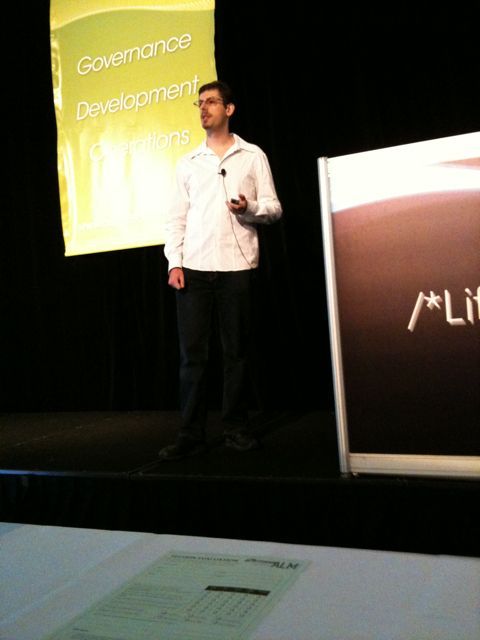
Here are the slides and code from yesterday’s talk at Sydney ALT.NET.

See Steve Sanderson’s post for the code/binary for subclassed aspx compiler and more information about the automatic encoding approach we covered in the talk.

Windows / .NET Dev Tools

Recently I visited a .NET dev team to take a look at design, code and processes with a view to making recommendations to improve delivery speed. One of the more minor, but easily generalisable areas is around tooling. I often find that the little extra tools you pick up can make your work significantly more efficient. Here are a few free ones I use:

KDiff3
A brilliant merge tool that plugs nicely into TFS or SVN. SVN integration is automatic from the Kdiff3 installer. TFS integration is manual, but quite easy.

Console2
A tabbed console which works well with classic windows shell and powershell. Good support for resizing, copy paste, etc.

.NET Reflector
.NET decompiler for those dlls that don’t have source. There is also a great plugin that lets you decompile entire assemblies to files on disk.

Fiddler
When you’re debugging SOAP or RESTful web services, Fiddler is great. It lets you see the messages sent / received and even change and impersonate them.

QueryExpress
If you’ve got SQLExpress or just no tools installed, QueryExpress is a tiny (~100K) and quick query analyser style application for all breeds of MS SQLServer. Download in a few seconds, and be running queries before a minute is up.

Unlocker
Don’t you hate it when Windows gets its locks in a mess and you can’t delete/rename files? Unlocker will automatically pop up, show you which applications are holding file locks and let you release the locks.

Process Explorer
A more powerful and accurate Task Manager application which allows you to see file locks and many other types of information.

Talk: Securing your MVC site against Code Injection and X-Site Scripting

I’ll be giving a lightning talk on securing your ASP.NET MVC site against code injection and x-site scripting next Tuesday 25 August at the Sydney ALT.NET group. I’ll be demonstrating potential pitfalls and dangers of arbitary code injection, and how you can protect against it, elegantly. We’ve got 6 interesting talks lined up for the night. See you there!

“Ruby for Rails” by David Black

Ruby For RailsRuby for Rails by David Black is a fun read that takes concentration but repays it with little epiphanies that explain syntax and language features that you had previously taken for granted.

The book aims to “help Rails developers achieve Ruby mastery”. The coverage of Ruby features is not complete and there are some concepts missed that I would have liked to have read more about (eg, how do instance variables work under the hood?). There are also a number of introductory chapters on Ruby and Rails and some chapters devoted to a sample Rails project (R4RMusic) which I flicked through but didn’t add much value for me (they are also a little dated). By far, the most interesting parts of the book for me were on the Ruby type system, ‘self’ in various situations and how method look up works with modules and inheritance.

An area of Ruby that I had not previously explored was adding singleton methods to instances (like what you can do in Javascript). Eg,

o = Object.new
def o.say_hi
  p "hi"
end

>> o.say_hi
"hi"

or alternatively

o = Object.new
class << o
  def say_hi
    p "hi"
  end
end

Now, the interesting thing is that this is the basis for the whole class system in Ruby!

Classes are just a special type of object, and when you add class methods, you are really adding singleton instance methods to the class object for the type.

Ie, when you do something like:

class Cars
  def self.find_all
    ...
  end

You are actually creating a new object, of type Class which has a singleton method called 'find_all'. 'self' in the code above is the Class object, so def self.xxx is adding a singleton method to it.

This also explains the alternative syntax for adding class methods:

class Cars
  class << self
    def find_all 
      ... 
    end
  end

The same thing could be done by saying:

Cars = Class.new
Cars.instance_eval { def find_all; ... end; }

In Ruby, the type and class system is not very different from the normal objects you work with every day. I find this really quite cute and internally consistent.

The way the method search path works in ruby was also nicely explained in the book. Basically, finding a method starts at the top of the list below and stops as soon as a method with a matching name is found (ie, that responds to the message sent to the object):

  • Singleton methods on the object
  • Methods defined by the object's class
  • Methods defined by modules mixed in to the class
  • Methods defined by parent class
  • Methods defined by modules mixed into parent class
  • Repeat checking parents until get to Object
  • Methods defined on Object
  • Methods defined on Kernel (module mixed into Object)

This also explains why you can always call methods like 'p' from anywhere. They are coming from Kernel which is mixed in at the top of the inheritance tree for your object. Another case of internal consistency - there's no 'special' mechanism for these seeming globals.

Overall, I enjoyed the book and would recommend anyone having a read who has worked with Ruby and Rails but would like to dig a bit deeper.

Page 6 of 15

Powered by WordPress & Theme by Anders Norén